You’ve built a great product, but explaining it to a cold lead feels like pushing a boulder uphill. You know you need a high-converting product video, but when you look at the landscape, the barriers are high. You likely don’t have the 7 weeks or the $3,000 it takes to hire a mid-tier agency for a single 60-second clip.
Waiting for the right budget is costing you conversions today. The good news? You can bridge the gap yourself. This guide breaks down how to make a SaaS explainer video that looks professional, communicates value, and doesn’t break the bank while showing you exactly where the DIY road ends and where high-end automation begins.
1. Write a Script Using the 5-Part Framework
The biggest mistake DIYers make is starting with the software. Never open an editing tool before you’ve finalized your script. A beautiful video with a weak script is just expensive noise. To keep your viewers engaged, we recommend a battle-tested 5-part framework.
The 5-Part Script Framework
- The Hook (0–5 seconds): Address the specific pain point. Tired of losing track of client feedback in endless email threads?
- The Problem (5–15 seconds): Agitate the status quo. Show why the current way of doing things is slow, expensive, or broken.
- The Solution (15–20 seconds): Introduce your SaaS as the hero. Meet [Product Name], the centralized feedback loop for modern teams.
- The Benefits/Features (20–45 seconds): Show, don’t just tell. Highlight the 3 most impactful features. Focus on outcomes (time saved), not just inputs (buttons).
- The Call to Action (45–60 seconds): Tell them exactly what to do next. Start your 14-day free trial at our website.
Practical Instructions for Self-Writing
- Speak like a human: Read your script out loud. If it feels corporate or clunky to say, rewrite it. Use you and your” more than we and our.
- Keep it under 150 words: For a 60-second video, you need roughly 130 to 150 words. Anything more feels rushed; anything less feels empty.
- The So What? Test: After every feature you list, ask So what? If the answer isn’t that it saves the user money, time, or stress, cut it.
2. Create a Simple Storyboard
A storyboard is simply a visual roadmap of your script. It prevents the blank canvas syndrome once you start editing. You don’t need to be an artist; you just need to be organized.
What is a Storyboard?
Think of it as a comic book version of your video. Each panel represents a scene. On the left, you have your script line; on the right, a rough sketch or description of what is happening on screen.
How to Sketch (Even If You Can't Draw)
- Use Placeholders: Use squares for images, circles for avatars, and text lines.
- Focus on Logic: If the script says Your dashboard updates in real-time your storyboard should note: Show the Total Sales number ticking upward.
- The Slide Approach: If animation feels daunting, treat each scene like a PowerPoint slide. What is the one primary visual for this sentence?
Tools to Use: Paper and Pen (Fastest), Figma (Best for SaaS UI), or Excalidraw.
3. Choose Your Visual Style
Your visual style dictates your workload. For a DIY SaaS product video, you generally have three paths:
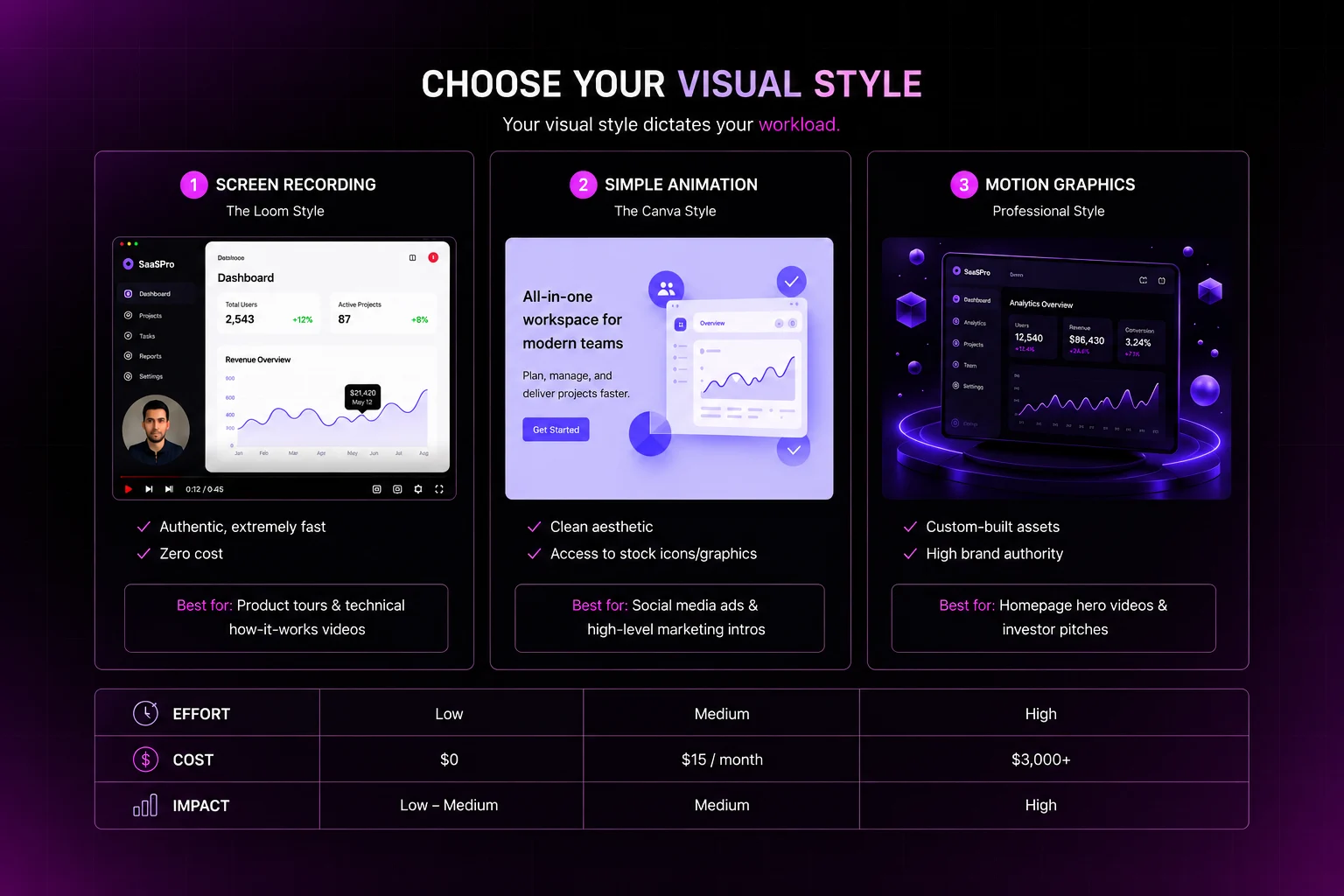
1. Screen Recording (The Loom Style)
- Pros: Authentic, extremely fast, zero cost.
- Cons: Can look cheap if not done carefully; hard to hide UI bugs.
- Best for: Product tours and technical How-it-works videos.
2. Simple Animation (The Canva Style)
- Pros: Clean aesthetic, access to stock icons/graphics.
- Cons: Limited customization; might look generic.
- Best for: Social media ads and high-level marketing intros.
3. Professional Motion Graphics
- Pros: Custom-built assets, fluid transitions, high brand authority.
- Cons: High skill floor or high agency costs (approx. $3,000+).
- Best for: Homepage hero videos and investor pitches.
Style Comparison Table
Style | Effort | Cost | Impact | Best For |
Screen Record | Low | $0 | Low-Medium | Tutorials/MVPs |
Simple Animation | Medium | $15/mo | Medium | Social Ads |
Motion Graphics | High | $3,000+ | High | Homepage/Sales |
4. Record or Generate Voiceover
The audio-visual experience is 50% audio. Poor audio quality will make even the best graphics look amateur.
- The DIY Route: Use a USB microphone in a room with soft furniture to kill echo. Avoid built-in laptop mics at all costs.
- AI Voiceovers: Tools like ElevenLabs are now indistinguishable from humans. They are affordable, instant, and allow for easy fixes.
- Professional Voiceovers: Sites like Fiverr and Upwork offer professional voice artists for $200–$500. This adds a layer of polish and emotional depth that AI voiceovers sometimes miss.
Quality Goal: Aim for Clear and Crisp. If there is background hiss, your viewer will subconsciously distrust your software’s reliability.
5. Edit and Export
Now, bring the script, visuals, and audio together. This is where the rhythm of your video is born.
Timing and Pacing
The visuals should change every 3–5 seconds. If a screen stays static for too long, the viewer’s brain checks out. Use cuts to zoom into specific UI elements or transitions to move between concepts.
Music and Sound Effects
- Background Music: Keep it low (around -18db to -24db). It should be an energy provider, not a distraction
- SFX: Subtle pops or whooshes when text appears can make a DIY video feel 2x more professional.
Conclusion
The DIY approach is perfect for your first draft, your MVP, or for iterating on a new feature. It allows you to test your messaging without risking your entire marketing budget.
However, as you scale, good enough starts to hit a ceiling. When you’re ready for a conversion-optimized, high-fidelity video that positions you as a market leader, you usually have to face the 7-week agency grind.
Early Bird Access – Join the Waitlist
We are building the exact Living Video infrastructure that this 2026 report demands. Don’t let your marketing lag behind your product updates.
Priority Access: Skip the queue and be the first to automate your video production before the public launch.
Founder’s Pricing: Secure exclusive, lifetime discounts that will never be offered to the public again.
Strategy Support: To ensure your success, early members receive a free video marketing audit from our expert strategy team.
FAQ
1. Can I create a SaaS explainer video without hiring an agency?
Yes. With tools like Canva, Figma, Loom, and AI voice generators, startups can create professional SaaS product videos without spending thousands on an agency.
2. What is the best script structure for a SaaS explainer video?
The best structure includes five parts: Hook, Problem, Solution, Features/Benefits, and Call to Action. This framework keeps the message clear and conversion-focused.
3. What mistakes should I avoid in a SaaS explainer video?
Avoid overly technical language, long introductions, cluttered visuals, poor audio quality, weak CTAs, and scripts that focus only on features instead of user outcomes.
4. What is the ideal word count for a 60-second SaaS explainer video?
A 60-second SaaS explainer video script should ideally contain around 130–150 words to maintain natural pacing and viewer engagement.
5. What is the future of SaaS explainer video production?
AI-powered automation is transforming SaaS video production by reducing costs, speeding up workflows, and enabling startups to create high-quality videos faster than traditional agencies.