You’ve poured thousands of dollars into targeted ads, perfected your landing page, and finally convinced a high-intent user to click that beautiful Start Free Trial button. Then silence. They log in once, click around for three minutes, confuse themselves, close the tab, and never return.
If this sounds painfully familiar, you are dealing with the dreaded SaaS trial drop-off. Across the software industry, the average product-led free trial conversion rate hovers between a measly 15% and 25%.
For opt-in trials (no credit card required), that number frequently plummets below 10%. If you want to reduce SaaS trial drop-off, you have to look past basic product metrics and understand why users leave before experiencing the true value of your software.
The culprit isn’t your product’s underlying code or its feature set. The culprit is the Time-to-Value (TTV) gap if users don’t experience an Aha! moment (the moment they realize the true value of your app) within their first active session, they drop off.
Fortunately, there is a highly scalable, high-leverage way to bridge this gap: Explainer Videos.
By strategically embedding short, targeted video assets into your onboarding workflow, you can visually guide trial users past friction points, slash time-to-value, and drastically improve your Net Revenue Retention (NRR). Let’s dive into how to systematically diagnose your trial drop-off and fix it using video.
Psychology of Trial Drop-Off
To solve trial drop-off, we have to look past simple analytics dashboards and understand the user’s emotional and psychological state when they first enter a new software dashboard.
The Friction-to-Value Paradox
When a user signs up for a SaaS product, they are operating with high motivation but a very low attention span. They want a specific problem solved now.
Unfortunately, standard B2B software setup processes look like this:
- Confirming email addresses.
- Inviting team members.
- Integrating APIs or connecting data sources.
- Configuring custom settings dashboards.
This is the Velocity Paradox. You need data to show value, but requesting that data creates friction. Every configuration field you present increases cognitive load. If the user feels overwhelmed or experiences a micro-frustration, they abandon the trial.
Why Text-Heavy Tooltips and Product Tours Fail
For years, the standard SaaS onboarding playbook was to slap a generic digital adoption tour over the UI. You know the ones: five sequential pop-up modals with text tooltips pointing at various buttons, forcing users to click Next just to get rid of them.
These tours fail for three specific reasons:
- They disrupt workflow rhythm: They force the user to read long blocks of text instead of taking meaningful action.
- They lack context: They explain what a button does (Click here to create a project), but they fail to explain why it matters to the user’s business.
- They ignore diverse learning styles: A massive segment of your user base processes visual and auditory information significantly faster than written documentation.
The Strategic Role of Explainer Videos in Product-Led Growth (PLG)
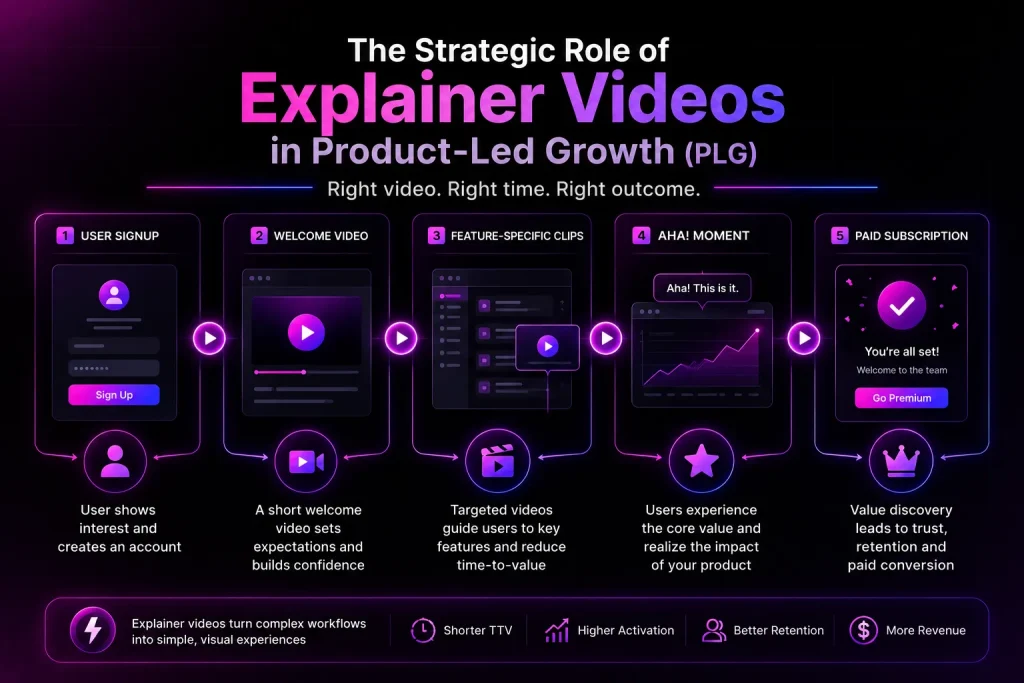
Explainer videos don’t just sit on your homepage to drive top-of-funnel marketing acquisition. When applied to customer onboarding, specialized videos become active conversion tools.
[User Signup] -> [Welcome Video] -> [Feature-Specific Clips] -> [Aha! Moment] -> [Paid Subscription]
Slashing Time-to-Value (TTV)
Time-to-Value is the duration between when a user signs up and when they realize the product’s core value proposition. The shorter your TTV, the higher your trial-to-paid conversion rate.
An onboarding video compresses this timeline. Instead of a user spending 20 minutes reading a documentation knowledge base to learn how to set up an analytics tracking script, a 60-second video can show an over-the-shoulder recording of the exact copy-and-paste action. It turns an abstract technical task into a concrete, easily replicated step.
Driving the Elusive Aha! Moment
The Aha! moment is the exact point during a trial where the user recognizes the tangible ROI your product provides. For Slack, it’s when a team sends 2,000 messages. For Dropbox, it’s when a user saves a file in one folder on one device and views it on another.
Videos should not highlight every single feature your engineering team built. Instead, reverse-engineer your onboarding assets to guide users strictly toward the actions that trigger your specific Aha! moment.
4 Types of Onboarding Videos Your SaaS Needs
To maximize retention, you shouldn’t just create one long 10-minute training video. Instead, build a modular video library mapped to specific stages of the trial user journey.
1. The Welcome & Vision Video
- Placement: In-app popup on first-time login, or embedded in the very first automated onboarding email.
- Duration: 45 to 60 seconds.
- Objective: Celebrate the signup, set clear expectations, and show what the fully configured product looks like.
- The Hook: Keep production costs highly optimized here. A high-converting SaaS explainer video doesn’t require a Hollywood budget; you can secure premium, custom-animated B2B assets for a benchmark of around $3,000. Focus the narrative on the end result your user will achieve.
2. The First Milestone Micro-Video
- Placement: Embedded directly adjacent to complex setup screens (e.g., database integrations, custom domain mapping).
- Duration: 30 to 45 seconds.
- Objective: Walk through a single, high-friction technical step.
- The Hook: Use side-by-side screencasts paired with clear UI callouts. Minimize background music and focus entirely on clean, step-by-step clarity.
3. The Secondary-Feature Explorer
- Placement: Triggered on Day 3 to Day 7 of the trial, or unlocked after the primary milestone is achieved.
- Duration: 60 to 90 seconds.
- Objective: Introduce sticky, advanced features that prevent long-term churn (e.g., setting up automated reports, building custom dashboards, configuring team permissions).
- The Hook: Frame these features around saving time or maximizing internal operational efficiency.
4. The Trial Expiration Value Realization Video
- Placement: Triggered 3 days before the trial ends via email or in-app slide-out notification.
- Duration: 60 seconds.
- Objective: Remind the user what they have built, created, or tracked during the trial, and clearly outline what they lose if the account lapses.
- The Hook: Use social proof or case study data here. Remind them how companies similar to theirs used these exact tools to fix core business problems.
Where to Embed Videos for Maximum Engagement
Creating excellent videos is only half the battle; placing them where users are experiencing friction is what shifts conversion metrics.
In-App Onboarding Dashboards
Instead of empty state dashboards that say No data found yet, use that blank real estate to host an educational explainer video.
Ensure your video player is natively integrated within the UI. Avoid using basic external links that pull users out of your software and onto platforms like YouTube or Vimeo, where they can easily be distracted by unrelated content. Use clean, zero-branding inline players that preserve the product experience.
Lifecycle Email Marketing Sequences
Your email marketing campaigns should act as an extension of your product UI. If a trial user logs out without completing their profile setup, send an automated behavior-triggered email.
Pro Tip: Do not embed raw video files directly into the body of your emails, as this can trigger spam filters and ruin deliverability metrics. Instead, use an image block featuring a high-quality video thumbnail with a visible Play button icon overlay.
Link this thumbnail directly to a dedicated, distraction-free landing page or deep-link it directly back into the relevant in-app setup screen.
Self-Service Documentation and Help Center
When users hit a roadblock, their first instinct is often to look for self-service help docs rather than waiting for a live chat support agent.
By placing short, feature-specific videos at the top of your most frequently visited knowledge base articles, you cater directly to users seeking instant support. This simple step lightens the load on your customer success teams while simultaneously decreasing the drop-off rates driven by technical confusion.
Comparative Matrix: Text vs. Video Onboarding
Onboarding Element | Text-Only Documentation | Explainer Video Integration | Impact on Conversion |
Average Time-to-Value (TTV) | High (Requires reading, interpretation, and trial-and-error) | Low (Provides instant visual modeling and mimicry) | Slashes TTV by 40-60% |
Cognitive Load on the User | High (Heavy text blocks induce user fatigue) | Low (Audio-visual storytelling simplifies complex concepts) | Increase onboarding completion rate |
Feature Adoption Depth | Shallow (Users stick only to features they find intuitive) | Deep (Unlocks complex, sticky secondary use cases clearly) | Reduces long-term Churn risk |
User Emotional Connection | Low (Impersonal, clinical step-by-step guides) | High (Humanizes the brand and showcases real use cases) | Boosts paid subscription upgrade rates |
Step-by-Step Scripting Framework for SaaS Onboarding Videos
To keep engagement high, your videos must be exceptionally concise. Use this structured four-part framework to script your onboarding video content:
1. The Context Hook (0-10 Seconds)
Acknowledge the specific problem the user is trying to solve right now.
- Bad: Welcome to our platform dashboard tutorial video.
- Good: Let’s get your billing data synced up so you can track your true growth metrics in less than two minutes.
2. The Simplified Walkthrough (10-40 Seconds)
Show the absolute shortest path to completing the action. Hide any unnecessary UI elements, zoom in on critical input fields, and use clear visual markers like highlights, arrows, and circles to guide the viewer’s eye.
3. The Value Payoff (40-50 Seconds)
Show the immediate positive result of completing that step. Display what the fully functional chart looks like, show the automated report arriving in an inbox, or show the clean code output. Give them a taste of success.
4. The Single Call to Action (50-60 Seconds)
End with one clear, unambiguous prompt. Tell them exactly what to do next.
- Example: Click the blue ‘Connect Database’ button on your screen right now to get started.
Measuring Success: Metrics That Actually Matter
Don’t look at vanity metrics like total video view counts. To understand if your video content is actually moving the needle on revenue and product growth, track these specific performance indicators:
Product Adoption Metrics
- Activation Rate: The percentage of trial users who successfully complete your designated key activation steps.
- Feature Adoption Rate: Track whether users who watched a specific feature snippet utilize that specific feature more frequently than the control group who did not watch.
- Support Ticket Deflection: Monitor the drop in standard how-to support queries following the implementation of video assets on high-friction setup pages.
Financial Growth Metrics
- Trial-to-Paid Conversion Rate: The percentage of free trial accounts that transition into paying monthly or annual subscribers.
- Customer Acquisition Cost (CAC) Efficiency: By automating onboarding workflows through scalable video assets, you lower the need for high-touch customer success interventions during the early trial phase, effectively lowering your overall CAC.
- Net Revenue Retention (NRR): Users who successfully onboard via clear visual workflows build stronger usage habits early on. This directly correlates with higher customer lifetime value, steady expansion revenue, and significantly lower net churn rates.
Conclusion
Reducing SaaS trial drop-off isn’t about badgering your users with daily automated text emails or forcing them through generic product tours. It’s about respecting their time, removing cognitive barriers, and getting them to their first Aha! moment as fast as humanly possible.
By producing targeted, high-quality, and modular SaaS explainer videos, you provide an intuitive learning pathway that transforms confused trial signups into confident, paying brand advocates.
Start small: identify the single biggest drop-off point in your current application funnel today, script a tight 45-second walkthrough video addressing that exact friction point, and watch your trial retention metrics scale.
Early Bird Access – Join the Waitlist!
Implementing a modular video onboarding strategy manually takes time, scripting, and consistent design effort. If you are tired of losing high-intent trial users to complex setup friction or losing enterprise deals to unexpected live-demo bugs and laggy sandbox environments, we are building a solution designed specifically for you.
We are building the future of automated, high-converting product walkthroughs. We are now opening Private Beta Access to a hand-picked group of forward-thinking founders, marketing strategists, and product builders who want to turn complex software interfaces into effortless, high-converting visual stories automatically.
By joining our exclusive waitlist today, you aren’t just getting early access to an AI-powered walkthrough engine; you’re gaining a massive competitive edge to protect your MRR and slash Time-to-Value (TTV).
Exclusive Member Benefits:
- Priority Beta Access: Skip the queue and be the first to generate production-grade video walkthroughs and feature clips before the official public launch.
- Founder’s Pricing: Secure exclusive, lifetime discounts and grandfathered tier pricing that will never be offered to the general public again.
- 1-on-1 Strategy Support: Early waitlist members receive a completely free onboarding funnel audit and video layout roadmap from our expert strategy team to ensure your activation rates scale instantly.
FAQs
1. What is SaaS trial drop-off?
SaaS trial drop-off occurs when users sign up for a free trial but stop using the software before experiencing its core value or converting to a paid plan.
2. How can explainer videos reduce SaaS trial drop-off?
Explainer videos simplify onboarding, reduce confusion, shorten Time-to-Value (TTV), and help users understand key features faster.
3. Why is Time-to-Value important for SaaS conversions?
A shorter TTV increases user engagement, activation rates, and trial-to-paid conversions by helping users see value quickly.
4. What types of onboarding videos should SaaS companies create?
SaaS companies should create welcome videos, set up walkthrough videos, feature adoption videos, and trial expiration reminder videos.
5. How long should SaaS onboarding videos be?
Most effective onboarding videos are between 30 and 90 seconds, focusing on one specific task or outcome.