Imagine a new customer signs up for your SaaS product.
They are excited to try it. However, after logging in, they see multiple dashboards, menus, features, and settings. They do not know where to start.
After a few minutes, they leave.
This is one of the biggest challenges SaaS businesses face.
Getting users to sign up is important. However, getting them to understand, use, and continue using the product is even more important.
This is where SaaS Onboarding Videos can make a major difference.
Instead of asking new customers to read lengthy documentation, onboarding videos visually guide them through the product.
They show users what to do, where to click, and how to reach their first meaningful result.
A good onboarding video for SaaS can reduce confusion and shorten the learning curve.
It can also help users discover important features earlier.
As users become more comfortable with the product, product adoption can improve.
In this article, we will explore how SaaS onboarding videos increase product adoption, why video is effective for customer education, and how SaaS businesses can build an onboarding experience that keeps users engaged.
1. SaaS Onboarding Videos Make the First Product Experience Easier
The first few minutes of a user’s experience can influence their opinion of a SaaS product.
If the product feels confusing, users may leave before discovering its value.
A structured onboarding experience solves this problem.
1.1 Guide Users Through the First Steps
New users usually have one simple question:
“What should I do first?”
An onboarding video can answer this immediately.
For example, a project management platform can show users how to create their first project, invite team members, and add their first task.
The video does not need to explain every feature.
Instead, it focuses on helping the user achieve an early success.
This creates a smoother first experience.
Users can also pause and replay the video whenever they need help. Therefore, they can learn at their own pace.
1.2 Reduce Product Confusion
Modern SaaS products can contain many features.
Trying to explain everything during the first session can overwhelm users.
A short onboarding video can introduce only the most important features.
Later, additional videos can explain advanced workflows.
This creates a gradual learning experience.
As a result, users can understand the product without feeling overwhelmed.
2. Video Helps Users Reach Product Value Faster
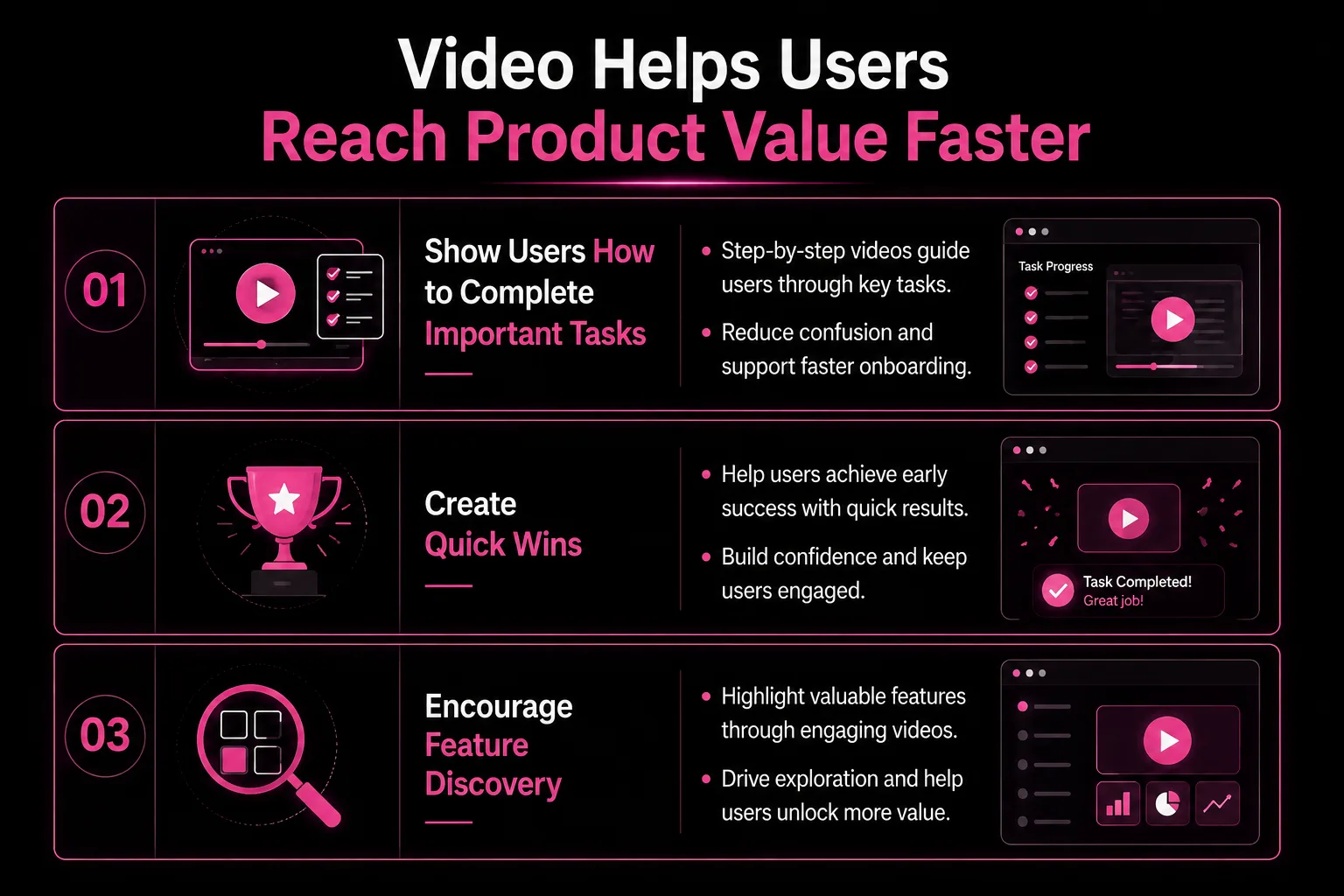
Product adoption depends heavily on how quickly users experience value.
If users cannot understand how a product helps them, they may stop using it.
SaaS onboarding videos can shorten this journey.
2.1 Show Users How to Complete Important Tasks
Reading instructions requires users to translate words into actions.
Video removes much of this effort.
Users can simply watch the process.
For example, a CRM onboarding video can demonstrate how to add a contact, create a sales pipeline, schedule a follow-up, and track an opportunity.
The customer sees the entire workflow.
Therefore, they can immediately repeat the process inside the software.
This practical learning approach makes onboarding more useful.
2.2 Create Quick Wins
A quick win happens when users accomplish something valuable soon after signing up.
This could be creating a campaign, generating a report, automating a task, or completing a project.
A strong onboarding video can guide users toward that first success.
Once users experience value, they have a stronger reason to continue exploring the platform.
This can improve engagement and encourage deeper product adoption.
2.3 Encourage Feature Discovery
Many customers only use a small percentage of a SaaS product’s features.
They may not know that useful tools exist.
Onboarding videos can introduce important features at the right moment.
For example, after showing users how to create a project, another video can introduce automation or reporting.
This creates a natural learning journey.
Over time, users discover more of the product.
3. Interactive SaaS Onboarding With Video Creates Better Engagement
Traditional onboarding often depends on written instructions and static documentation.
These resources still have value.
However, interactive video can create a more engaging learning experience.
SaaS interactive onboarding with video combines visual education with actions that encourage users to participate.
3.1 Combine Video With Product Actions
Interactive onboarding can guide users while they are using the actual software.
For example, a video may explain how to create a campaign.
The user can then follow the instructions directly inside the application.
This creates a connection between learning and doing.
Instead of passively consuming information, users actively complete tasks.
That can make onboarding more memorable.
3.2 Use Interactive SaaS Onboarding Videos to Improve Retention
Retention starts with a successful first experience.
When customers understand the product, they are more likely to continue using it.
Interactive SaaS onboarding videos to improve user retention can help by providing guidance at the moment users need it.
For example, if a user opens an advanced feature for the first time, a short video can explain how it works.
This prevents users from becoming stuck.
It also reduces the chance of abandoning the feature.
3.3 Keep the Experience Simple
Interactivity should support learning.
It should not make onboarding complicated.
Avoid adding unnecessary pop-ups, animations, or steps.
Instead, guide users toward meaningful actions.
The best onboarding experience feels helpful rather than distracting.
4. Professional SaaS Onboarding Videos Build Customer Confidence
Confidence is an important part of product adoption.
When customers understand how software works, they are more comfortable exploring it.
Professional onboarding videos can help create that confidence.
4.1 Use Clear Visual Explanations
A professional onboarding video can combine screen recordings, animation, narration, cursor highlights, and visual callouts.
These elements make the learning process easier to follow.
For example, a cursor highlight can show exactly where a user needs to click.
A zoom effect can draw attention to an important button.
A short animation can explain a complex workflow.
These visual techniques can make complicated software feel simpler.
4.2 Work With SaaS Onboarding Video Experts
Creating an effective onboarding video requires more than recording the product screen.
The content needs a clear learning structure.
This is why businesses often work with SaaS onboarding video experts.
A specialized team can help with:
- Scriptwriting and instructional structure.
- Storyboarding and product visualization.
- Animation, voice-over, editing, and final production.
The result is a more consistent onboarding experience.
4.3 Choose the Right Production Partner
SaaS businesses have different needs.
A startup may need a simple onboarding video for its first customers.
A larger software company may need an entire video-based learning library.
A SaaS onboarding video production agency for startups can create content based on the product stage, target audience, and budget.
Similarly, established software companies may benefit from comprehensive onboarding video production.
The important thing is to choose a team that understands SaaS products and customer education.
5. A Strong SaaS Onboarding Video Strategy Supports Long-Term Growth
Onboarding should not end after the user’s first login.
Customers continue learning as they discover new features.
Therefore, SaaS companies should treat onboarding as an ongoing process.
5.1 Build a Complete Video Learning Journey
A SaaS onboarding video library can include different types of content.
For example:
Welcome video → Setup tutorial → Core feature videos → Advanced workflow videos → Troubleshooting videos
This structure supports users at different stages.
New users can focus on the basics.
Experienced users can explore advanced capabilities.
As the product grows, new videos can be added.
This makes video a long-term customer education resource.
5.2 Keep Videos Updated
SaaS products change regularly.
Interfaces are redesigned.
Features are updated.
New workflows are introduced.
Outdated videos can confuse users.
Therefore, businesses should review onboarding content whenever major product changes occur.
Keeping videos current also improves customer trust.
5.3 Measure Onboarding Performance
Video production should be connected to measurable goals.
SaaS companies can track:
- Video completion rates.
- Feature usage after onboarding.
- User activation rates.
They can also monitor trial-to-paid conversions, support requests, and customer retention.
For example, if users who complete an onboarding video activate more features than users who skip it, the video may be contributing to stronger product adoption.
These insights can also help businesses improve future onboarding content.
How to Create the Best SaaS Onboarding Video
Creating the best SaaS onboarding video requires a user-first approach.
Start by identifying the biggest problems new customers experience.
Look at support tickets, onboarding calls, customer feedback, and product analytics.
These sources can reveal where users struggle.
Next, create videos around those specific problems.
Keep each video focused.
One video should ideally explain one important task or concept.
The language should also be simple.
Avoid unnecessary technical terms.
Most importantly, show the actual product whenever possible.
Users should be able to see exactly how the workflow works.
A clear voice-over can guide them through each step.
Captions can make the content accessible to users watching without sound.
Together, these elements create a better learning experience.
How SaaS Onboarding Videos Reduce Customer Support Pressure
Customer support teams often answer the same questions repeatedly.
Users may ask how to create an account, invite a team member, change a setting, or use a particular feature.
Instead of answering every question manually, SaaS businesses can create short onboarding videos.
These videos can become part of a self-service knowledge base.
Customers can find answers whenever they need them.
As a result, support teams can spend more time solving complex problems.
This does not eliminate human support.
Instead, it makes support more efficient.
Conclusion
SaaS Onboarding Videos are more than educational content.
They are an important part of the SaaS customer experience.
A well-designed onboarding video can help users understand a product faster, complete important tasks, discover valuable features, and experience their first quick win.
As a result, users have more confidence in the product.
Interactive experiences can take this further by allowing customers to learn while actively using the software.
For startups and software companies, investing in professional onboarding content can also reduce repetitive support questions and create a scalable customer education system.
However, successful onboarding is not about creating the longest or most detailed video.
It is about giving users the right information at the right moment.
A clear video can turn a confusing first login into a guided product experience.
Therefore, SaaS businesses that want stronger product adoption should consider video as an essential part of their onboarding strategy.
With the right planning, production quality, and user-focused content, SaaS onboarding videos can help customers reach value faster and stay engaged for longer.
Frequently Asked Questions
What is a SaaS onboarding video?
A SaaS onboarding video is educational content designed to help new users understand and use a software product. It typically explains setup, core features, workflows, and important first steps.
How do SaaS onboarding videos increase product adoption?
They help users understand the product faster. By guiding customers toward important tasks and quick wins, onboarding videos encourage users to explore and regularly use more features.
What makes a good onboarding video for SaaS?
A good onboarding video is short, focused, visual, and easy to follow. It should solve a specific user problem and help customers achieve a meaningful result.
What are SaaS onboarding videos used for?
They can be used for product setup, feature education, customer training, workflow tutorials, and ongoing product education.
Can interactive SaaS onboarding improve retention?
Yes. Interactive experiences can connect learning with real product actions. This helps users complete tasks while learning and can reduce confusion during the customer journey.