Selling software is not always easy. A SaaS product may offer powerful features, automation, integrations, and advanced analytics, but potential customers may still struggle to understand how it solves their business problems.
This creates a challenge for sales teams. They must explain technical concepts, demonstrate product value, answer repeated questions, and help prospects compare solutions before making a purchase decision.
Traditional sales presentations and lengthy product descriptions do not always communicate this information effectively. Some prospects need a simpler way to understand the software before agreeing to a meeting or starting a trial.
This is where a SaaS explainer video maker can help.
A professionally produced explainer video turns complex software into a clear visual story. It demonstrates the problem, introduces the solution, and explains why the product matters to the customer.
Sales teams can then use the video across presentations, landing pages, email campaigns, and follow-up conversations.
For SaaS businesses, the goal is not simply to create an attractive video. It is to help potential customers understand the product and make informed buying decisions.
1. SaaS Explainer Video Makers Help Sales Teams Explain Complex Products
One of the biggest challenges in SaaS sales is communicating technical information to people with different levels of knowledge.
A product might include multiple dashboards, integrations, automation workflows, and advanced features. While these capabilities may be valuable, prospects can become confused when sales representatives explain everything at once.
A SaaS explainer video simplifies this process through visual storytelling.
Instead of describing every feature verbally, the video shows how the software works and connects its capabilities to a real business problem.
Turn technical features into business value
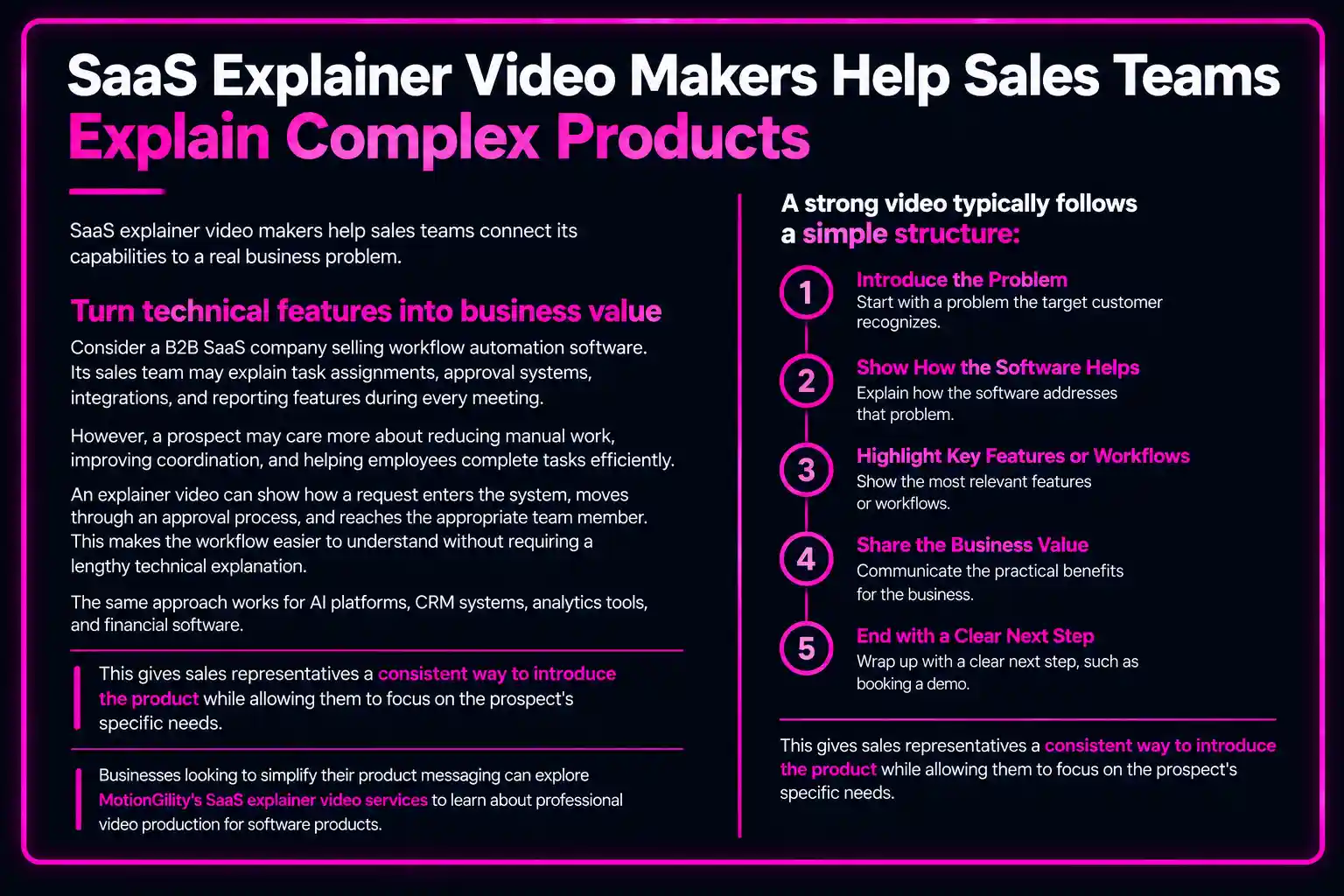
Consider a B2B SaaS company selling workflow automation software. Its sales team may explain task assignments, approval systems, integrations, and reporting features during every meeting.
However, a prospect may care more about reducing manual work, improving coordination, and helping employees complete tasks efficiently.
An explainer video can show how a request enters the system, moves through an approval process, and reaches the appropriate team member. This makes the workflow easier to understand without requiring a lengthy technical explanation.
The same approach works for AI platforms, CRM systems, analytics tools, and financial software.
A strong video typically follows a simple structure:
- Introduce a problem the target customer recognizes.
- Explain how the software addresses that problem.
- Show the most relevant features or workflows.
- Communicate the practical business value.
- End with a clear next step, such as booking a demo.
This gives sales representatives a consistent way to introduce the product while allowing them to focus their conversations on the prospect’s specific needs.
Businesses looking to simplify their product messaging can explore MotionGility’s SaaS explainer video services to learn about professional video production for software products.
2. SaaS Explainer Videos Help Sales Teams Engage Potential Customers
Getting a prospect’s attention is only the first step. Sales teams must also keep the person interested long enough to communicate the product’s value.
This can be difficult when a presentation contains too much text, technical terminology, or repetitive explanations.
An explainer video offers a more visual way to introduce the product.
Through animation, motion graphics, narration, and product interface visuals, it can guide viewers through the information in a logical sequence.
Make the first interaction more useful
Imagine a sales representative contacting a business that has never used the company’s software before.
A lengthy introductory email may not give the recipient enough context to understand the product. A short, relevant explainer video can provide that context before the representative requests a meeting.
The recipient can see the problem the software addresses, understand its main purpose, and decide whether the solution is relevant to their business.
Sales teams can use these videos in several places:
Cold outreach: Include a relevant video link in an introductory email when it directly addresses the prospect’s business challenge.
Sales presentations: Use a short video to introduce the product before discussing detailed features.
Follow-up emails: Share the video with prospects who need additional information after an initial conversation.
Website landing pages: Give visitors a visual introduction before asking them to book a demo or request a consultation.
LinkedIn campaigns: Use shorter video edits to introduce the product to relevant professional audiences.
However, video engagement alone does not guarantee sales. The content must match the audience’s needs, and the next step should be relevant to the viewer.
3. SaaS Explainer Video Makers Help Address Buyer Objections
B2B software purchases often involve more than one decision-maker. A product champion may like the software, but managers, finance teams, IT specialists, and other stakeholders may have different concerns.
Some may question whether the product integrates with existing systems. Others may want to understand implementation requirements, security considerations, or the value of the investment.
Sales representatives can answer these questions individually, but repeating the same explanations throughout the sales process takes time.
A carefully planned explainer video can address common product questions before they become barriers to further discussion.
Create content around common sales objections
Start by reviewing the questions prospects ask most frequently during demos and sales calls.
For example:
- How does the software fit into our existing workflow?
- Which business problem does it solve?
- How will employees use the product?
- What makes this solution different from alternatives?
- What should we understand before starting a trial?
These questions can guide the video script.
A project management SaaS company, for instance, could create a video showing how its platform centralizes tasks, assigns responsibilities, and tracks project progress.
This gives potential customers a practical view of the workflow rather than relying only on feature descriptions.
For more technical questions, the video can direct viewers to relevant documentation, security information, or a detailed product demo. It should not make unsupported promises or attempt to replace information that requires a technical review.
Give every stakeholder a clearer starting point
A prospect can also share the video internally with colleagues who were not present during the original sales conversation.
This allows other stakeholders to understand the basic product concept before joining a meeting.
As a result, sales discussions can spend more time on specific requirements, implementation, and product fit instead of repeatedly covering introductory information.
4. Explainer Videos Help Sales Teams Nurture Leads Throughout the Buying Journey
Not every prospect is ready to purchase after the first interaction.
Some people are exploring solutions, while others are comparing competitors or waiting for budget approval. A single sales call may not provide enough information or confidence for them to move forward.
This is why SaaS businesses need a structured lead-nurturing process.
Explainer videos can support that process by providing useful product information at different stages of the buying journey.
Match the video to the prospect's stage
Buying stage | Prospect’s need | Suitable video |
Awareness | Understand a business problem | Short problem-focused explainer |
Consideration | Explore possible solutions | Product explainer video |
Evaluation | Understand specific capabilities | Product demo or feature walkthrough |
Decision | Confirm product fit | Use-case video or tailored presentation |
After purchase | Learn how to get started | Onboarding or training video |
For example, a visitor who discovers a SaaS company through Google may initially need a short introduction to the product. After requesting a demo, that person might benefit from a more detailed walkthrough of relevant features.
Once the prospect becomes a customer, onboarding videos can help explain essential tasks and workflows.
This creates opportunities to reuse video content across marketing, sales, and customer success.
Make follow-ups more relevant
Instead of sending every lead the same generic message, sales representatives can share a video related to the prospect’s specific concern.
A prospect interested in reporting features could receive a walkthrough of the reporting workflow. Someone evaluating integrations could receive relevant product information alongside documentation.
The objective is to provide useful answers rather than send more promotional material.
Businesses can also connect their videos with SaaS video marketing strategies to plan how video content supports different marketing and sales activities.
5. Professional SaaS Explainer Video Production Creates Consistent Sales Messaging
Different sales representatives may explain the same product in different ways. One person might focus on technical capabilities, while another emphasizes cost savings or ease of use.
Although sales conversations should be personalized, inconsistent product messaging can create confusion.
A professionally produced explainer video gives the team a reliable introduction that communicates the product’s core value consistently.
Why production quality and scripting matter
A good video begins with a clear understanding of the audience and the sales objective. Animation alone cannot solve a messaging problem.
The script should explain the customer’s challenge, show how the product helps, and highlight only the features that support the main message.
A structured production process generally includes:
Audience research: Identify the target customer, common objections, and important buying considerations.
Script development: Turn the product’s technical capabilities into a clear, customer-focused narrative.
Storyboarding: Plan how each message will appear visually before full production begins.
Animation and editing: Use product interfaces, motion graphics, and other visuals to support understanding.
Voice-over and sound design: Make the explanation easier to follow and maintain a consistent brand tone.
Final review: Check product accuracy, messaging, readability, and the intended call to action.
This is particularly important for SaaS companies whose products change frequently.
Outdated screenshots or incorrect feature descriptions can undermine the credibility of a sales video.
Before commissioning a project, businesses should discuss update requirements, revision terms, delivery formats, and intended use with their production partner.
If your sales team needs a clearer way to present your software, explore MotionGility’s SaaS explainer video production services and discuss a video tailored to your product and audience.
6. SaaS Explainer Video Makers Help Teams Measure and Improve Sales Performance
A sales video should support a defined business objective. Without measurement, it can be difficult to determine whether the content is helping prospects move through the sales process.
SaaS companies should therefore evaluate videos using metrics that connect engagement with meaningful sales activity.
Track the metrics that matter
Video engagement: Review how many people start watching and how much of the video they complete. This can help identify whether the content holds viewers’ attention.
Demo requests: Track whether viewers proceed to book a product demonstration after watching the video.
Landing-page conversions: Compare conversion performance across relevant pages or campaigns, accounting for other changes that could influence results.
Sales-qualified leads: Review whether leads who engage with the video meet the company’s qualification criteria.
Sales-cycle progression: Observe whether prospects move from initial interest to evaluation, proposal, or another defined stage.
Sales-team feedback: Ask representatives whether the video answers common questions and improves the quality of sales conversations.
No single metric proves that a video caused a sale. For a more reliable assessment, compare performance over time, use consistent tracking, and consider factors such as audience quality, traffic sources, pricing, and sales follow-up.
Improve the video based on real feedback
Suppose analytics show that many viewers stop watching before the product’s main benefit appears. The opening may be too slow, or the video may contain too much introductory information.
Similarly, if prospects repeatedly ask questions that the video does not answer, the script may need to address those concerns more clearly.
Use these insights to refine the messaging, visuals, length, placement, or call to action.
For more detailed product demonstrations, companies can also develop supporting SaaS product videos that focus on specific features and buying questions.
Conclusion
A SaaS explainer video maker can help sales teams communicate complex software, engage potential customers, address common objections, and provide consistent product messaging throughout the buying journey.
The most effective videos are built around customer needs rather than a long list of product features. They explain the problem, demonstrate the solution, and guide prospects toward an appropriate next step.
For SaaS businesses, this makes explainer videos useful across sales presentations, landing pages, email campaigns, product demonstrations, and lead-nurturing activities.
However, results depend on more than the video itself. Clear messaging, relevant distribution, a strong call to action, and consistent performance tracking all contribute to its usefulness.
If your business wants to make its software easier to understand and give sales representatives a more effective way to present product value, explore MotionGility’s SaaS explainer video services. Discuss your product, audience, and sales objectives with the team to identify a suitable video approach.
Frequently Asked Questions (FAQs)
1. What is a SaaS explainer video maker?
A SaaS explainer video maker is a tool, service, or production partner used to create videos that explain software products. These videos can combine animation, motion graphics, narration, and product visuals to communicate how a SaaS platform works and what problems it solves.
2. How do SaaS explainer videos help sales teams?
SaaS explainer videos give sales teams a visual way to introduce products, explain complex features, address common questions, and maintain consistent messaging. They can be used in presentations, email follow-ups, landing pages, and lead-nurturing campaigns.
3. What should a SaaS sales explainer video include?
A sales-focused explainer video should identify the target customer’s problem, introduce the software solution, demonstrate relevant features, explain the business value, and provide a clear next step. The content should focus on the audience’s needs instead of covering every product feature.
4. How long should a SaaS explainer video be for sales?
The appropriate length depends on the video’s purpose and complexity. A short overview may take around 60–90 seconds, while a detailed product walkthrough may require more time. The priority should be communicating the message clearly without adding unnecessary detail.
5. How much does professional SaaS explainer video production cost?
The cost depends on script development, video length, animation style, product complexity, voice-over, customization, and revision requirements. SaaS companies should request a tailored quote that outlines the deliverables, production timeline, and intended usage.